Common issues when paying with USDC on the Solana network

Trying to send USDC on Solana from your wallet but getting an error?
If your Solana or USDC payment is failing on Cryptorefills, you are likely hitting one of a handful of known errors. Here is what each one means and how to fix it in under a minute.
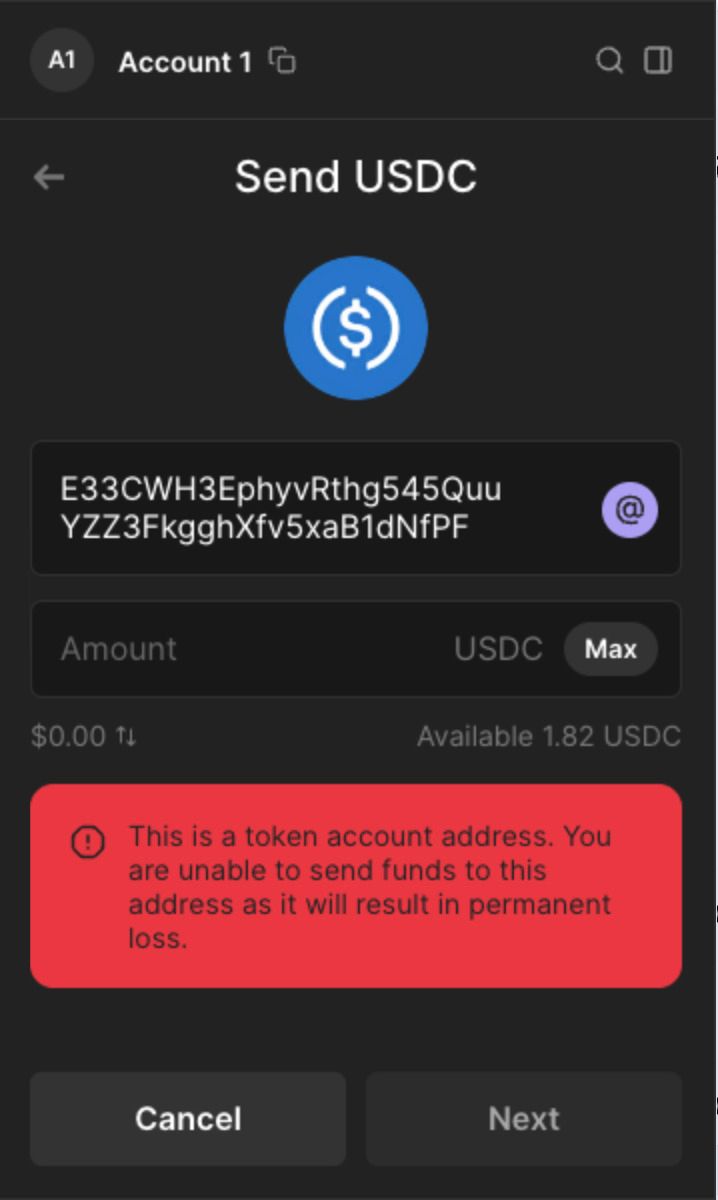
"This is a token account address. You are unable to send funds to this address as it will result in permanent loss."
1. Wallet address (Solana account address)
- Definition: A wallet address is the primary address that holds SOL (the native token of Solana). It represents your account on the Solana network.
- Purpose: This address is used for holding SOL, staking, and paying for transaction fees. It acts like a regular wallet where you can send, receive, and store SOL.
- Format: It is a base-58 encoded string (e.g., 3Tdbn6A3x7djfZBzQ7tmHnKsRRtP8y9boDaj43npFjJj).
- One address: You typically have just one wallet address unless you create additional ones.
2. Token-associated wallet address (Token account)
- Definition: A token-associated wallet address is a specific account linked to your wallet address that holds a specific SPL (Solana Program Library) token, such as USDC or any other custom tokens on the Solana network.
- Purpose: Since Solana uses an account-based model (not UTXO like Bitcoin), each SPL token requires its own associated account. This means if you hold USDC on Solana, it is stored in a separate token account created specifically for that token.
- This ensures that each token has a distinct space where it is stored.
- Creation: A token-associated wallet address is typically created automatically the first time you interact with a token, such as receiving or swapping it. You can have multiple token accounts, each associated with a different SPL token.
- Format: It is also a base-58 encoded string (e.g., E5v2fDeCsF7pFezAyPyABTo7PxShts28hgPVdTmfobUG), but distinct from your main wallet address.
- Unique for each token: Every token (USDC, for example) has its own token account for storage under your main wallet.
Example
- Wallet Address: This is where you store SOL. You use this address for sending and receiving SOL.
- Token-Associated Wallet Address: This is where you store USDC or any other SPL token. You need a separate associated wallet for each token.
Why this matters
When interacting with tokens on Solana (like USDC), you need a token-associated wallet address for the specific token. If you only have a main Solana wallet address and you want to receive USDC, your wallet or the blockchain will automatically create a USDC-associated token wallet under your main Solana wallet address.
Some wallets automatically generate the Token-associated wallet address in the background after entering the wallet and adding the token. Other wallets do not do this.
An example of a wallet that, as on 25-09-24, does not create the Token-associated wallet address when manually sending a USDC transaction is Phantom Wallet. In such cases, you will encounter the following error.
"This is a token account address. You are unable to send funds to this address as it will result in permanent loss."
Solution
The easiest solution is to start the transaction by connecting your wallet to Cryptorefills and opening the prepopulated transaction by clicking 'Open in wallet.'

After clicking 'Open in wallet,' the Phantom transaction will appear as shown below.
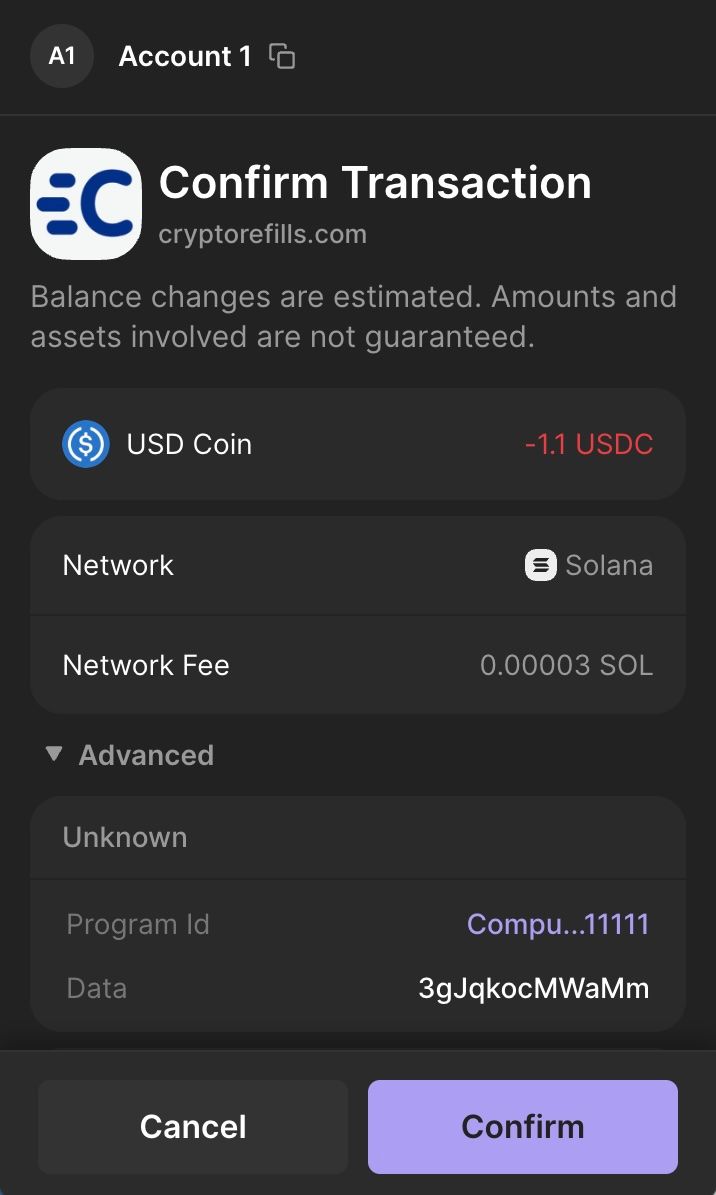
Let’s take a closer look at the transaction data by expanding the advanced section.
In this transaction, you will see the destination address Bqk7u...LD6Xw, which is the token-associated wallet address (Token account) for the wallet E33CWH3EphyvRthg545QuuYZZ3FkgghXfv5xaB1dNfPF and the token USDC.
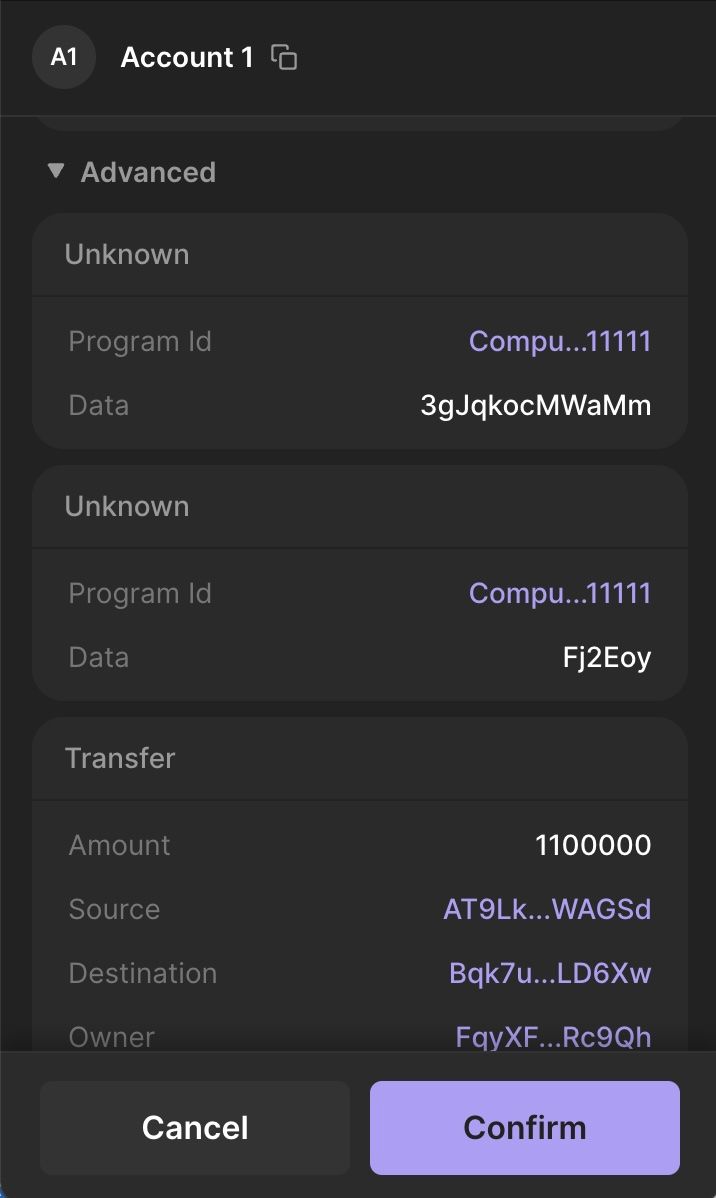
No action is required on your part when using the 'Open in wallet' transaction. Simply click confirm, and Cryptorefills will deliver your product once the payment is confirmed.
Frequently asked questions
- This happens when you manually copy the USDC payment address into Phantom instead of using the "Open in wallet" button. Phantom does not automatically create the token-associated wallet address when sending manually. Always use "Open in wallet" on the Cryptorefills payment page.
- Yes. Even though you are sending USDC, you still need a tiny amount of SOL in your wallet to cover the Solana network gas fee. This is usually under $0.01.
- Your wallet address holds SOL. Each SPL token like USDC has its own separate token account linked to your wallet. Sending USDC to a wallet address instead of its token account causes the error shown in this article.
- Solana transactions are irreversible. If you sent to the wrong address, contact Cryptorefills support immediately. Always double-check before confirming.
- Most wallets handle the token account automatically. Phantom requires you to use the "Open in wallet" flow on Cryptorefills rather than copying the address manually. Backpack and Solflare handle this without the extra step.
- Most wallets handle the token account automatically. Phantom requires you to use the "Open in wallet" flow on Cryptorefills rather than copying the address manually. Backpack and Solflare handle this without the extra step.