How to withdraw Pump.fun tokens and spend them instantly

Pump.fun (commonly known as Pump) is a crypto trading platform that started on Solana and now runs on four blockchains: Solana, Base, BSC, and Ethereum. In this guide, we'll walk you through the step-by-step process to withdraw your funds from Pump and spend them. Pump.fun also supports card funding via MoonPay, so you can buy in with fiat directly on the platform.
Withdrawing from Pump.fun on Solana (Phantom wallet)
Before we proceed on the guide, make sure you have already swap your tokens into USDC. In this example, we will use the Phantom wallet.
- Go to the Profile section on your pump fun app.
- Click the Send button.
- Select the crypto you want to transfer.
- Paste your Phantom wallet's Solana address.
- Then click Send.
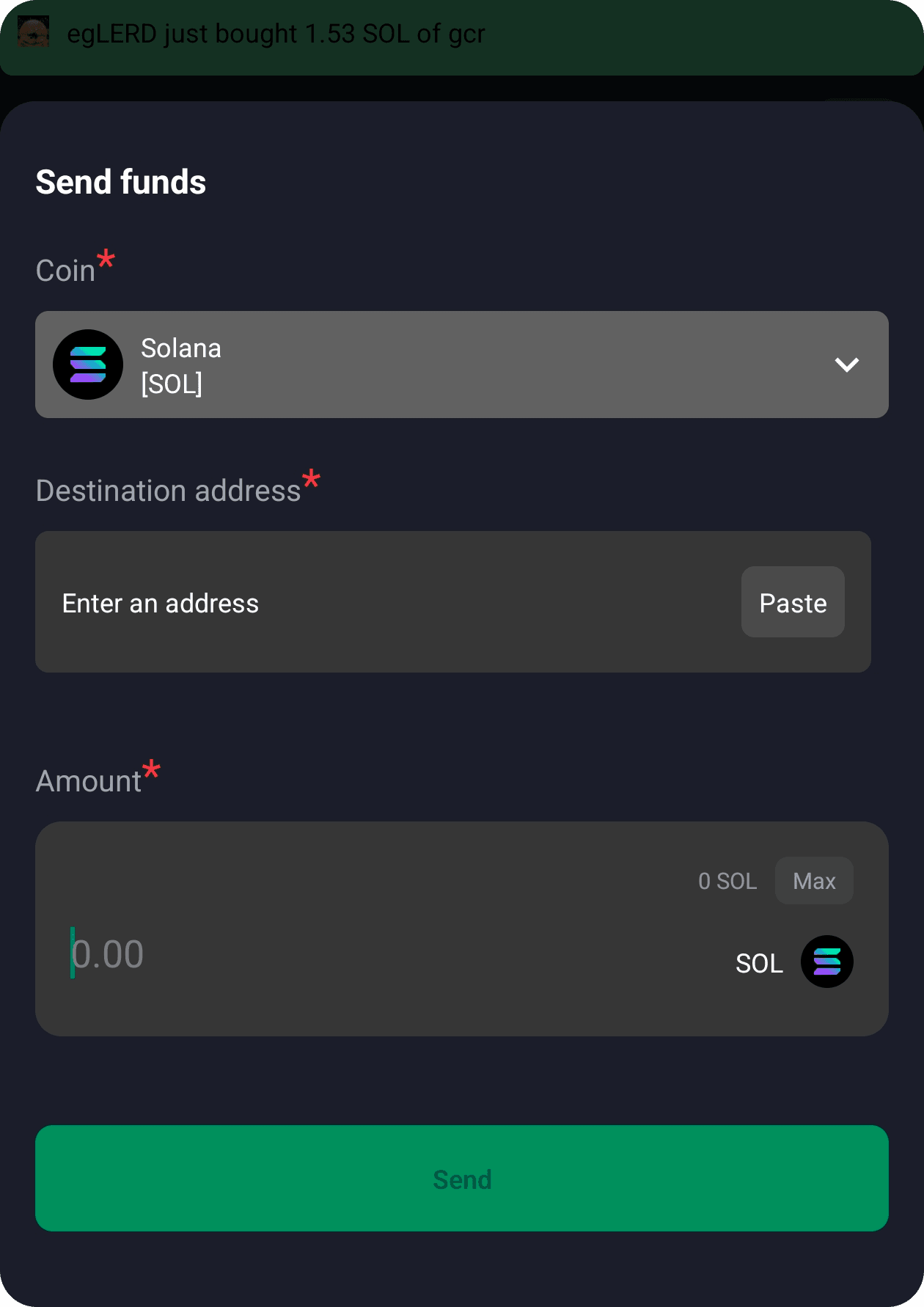
6. Once you received your crypto in your Phantom wallet, swap them to USDC.
How to withdraw BONK from Pump.fun
- Go to Pump.fun and open your BONK position
- Click Sell and swap BONK to SOL
- Open Cryptorefills and select a gift card
- Choose Solana at checkout
- Send SOL from your connected walletReceive your gift card instantly
How to withdraw WIF from Pump.fun
- Go to Pump.fun and open your WIF position
- Click Sell and swap WIF to SOL
- Open Cryptorefills and select a gift card
- Choose Solana at checkout
- Send SOL from your connected wallet
- Receive your gift card instantly
How to withdraw POPCAT from Pump.fun
- Go to Pump.fun and open your POPCAT position
- Click Sell and swap POPCAT to SOL
- Open Cryptorefills and select a gift card
- Choose Solana at checkout
- Send SOL from your connected wallet
- Receive your gift card instantly
Withdrawing from Pump.fun on Base, BSC, or Ethereum (MetaMask)
If you're using Pump.fun on Base, BSC, or Ethereum, you'll withdraw through MetaMask instead of Phantom. Before you start, make sure you've swapped your tokens into USDC on the relevant chain.
- Open Pump.fun and go to your Profile section.
- Click the Send button.
- Select the crypto you want to transfer.
- Open MetaMask and copy your wallet address for the correct network (Base, BSC, or Ethereum).
- Paste the address into Pump.fun and click Send.
- Once the funds arrive in MetaMask, you're ready to spend on Cryptorefills.
If you're on Ethereum and prefer extra security, you can use a hardware wallet like a Ledger or Trezor instead of MetaMask. The steps are the same, just confirm the transaction on your device.
To withdraw your funds, follow these steps
- Visit Cryptorefills.com on your phone or desktop.
- Select the product you would like to purchase (for example Paypal).
- Add the product to your card and go to the checkout page.
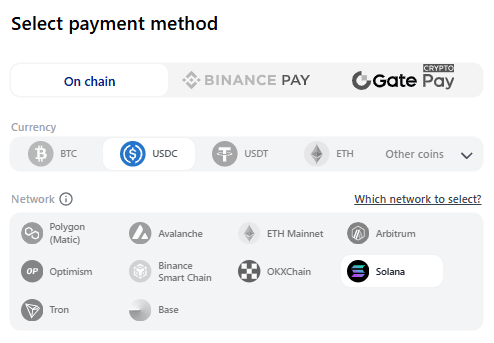
- Select the blockchain network and the coin you would like to withdraw from your Phantom wallet. (For example USDC on Solana) Continue to the payment page.
- Using your Phantom wallet, copy the payment address or scan the QR Code, and enter the amount you need to pay.
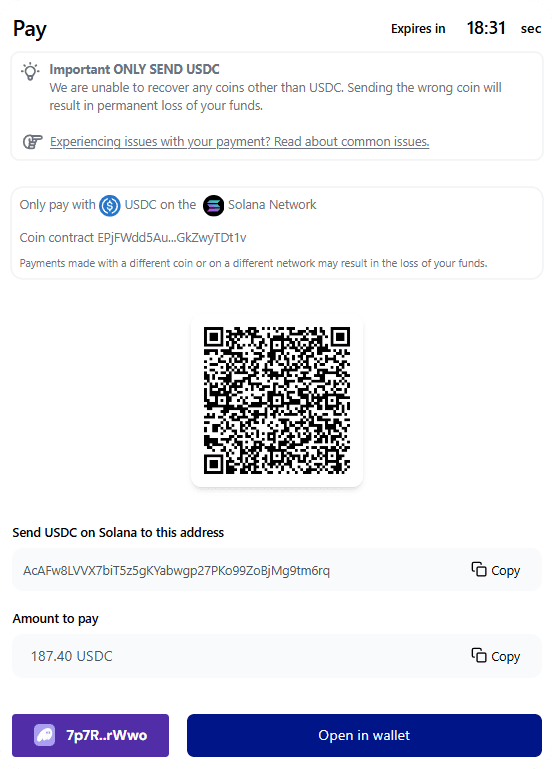
Select the correct coin (the same coin selected on the checkout page earlier) and enter the appropriate amount. Click "Continue" to proceed.
6. That's it! As soon as the transaction is confirmed on the network, your product details—in this case, PayPal—will be delivered to your email and displayed on the screen.
Does pump fun charge a fee to withdraw money?
When you transfer cryptocurrency from Pump to another wallet, Pump does not impose any additional transfer fees. However, you will need to pay network fees (gas fees) associated with the blockchain network.
Can you transfer money from Pump to a bank account?
Pump.fun doesn't support direct fiat withdrawals. To convert to fiat, transfer your crypto to a centralised exchange like Coinbase, Kraken, or Binance and withdraw from there. Alternatively, spend your crypto directly on Cryptorefills.
Frequently asked questions
- Most Pump.fun tokens need to be swapped to SOL first. Once you have SOL, you can spend directly on Cryptorefills, with no exchange account needed.
- No. Swap to SOL on Pump.fun, then send to Cryptorefills at checkout, without fiat conversion, and no KYC.
- Amazon, Steam, Netflix, Google Play, Visa prepaid, Xbox, PlayStation, Spotify, and 6,600+ other brands on Cryptorefills.
- Check cryptorefills.com for current minimums. Most gift cards start from $5-10 equivalent in SOL.
- Check cryptorefills.com for current minimums. Most gift cards start from $5-10 equivalent in SOL.